Today is Memorial Day. A day that many think of as synonymous with backyard BBQs and pool parties. But let us not forget what this day is really all about….
Thank you to all those who have served our country (past and present), and especially to those who have made the ultimate sacrifice.
We were originally planning to try to do a frugal potluck get-together at our house today, but we’re a little bit in Quarantine mode, as both kids have come down with some pretty terrible colds??? I say it with question marks because these are pretty wicked colds – involving fever, body aches, sore throat, coughing fits, etc. I took the kids to the doctor on Friday and he said it was just a bad cold, but it’s really knocked them out! They’re on the mend, but we thought it best to not be having people over just yet. Hopefully they’re back to 100% in another day or two.
I used You Need A Budget (YNAB) for years and loved the product. However, now that I’ve switched over to Dave Ramsey’s budgeting app, I’ve gotten a couple questions about how it’s going. For those wondering why I decided to make the switch, I thought I’d write this EveryDollar vs YNAB review. This is not a paid post (they don’t even know I exist) and I’m not receiving any type of kickback here. This is all just my personal opinion after using both programs.
EveryDollar Overview
Image Source: Every Dollar
EveryDollar uses the zero-based budgeting method that Dave Ramsey recommends. This type of budget requires you to plan your spending in advance and give each dollar you earn a specific job. I like that EveryDollar’s budgeting approach isn’t complex or theoretical—it’s directly based on your real-world finances and income.
It’s important to note that EveryDollar has both free and paid versions. I use the free plan, which is missing some premium features like automatic bank syncing and net worth tracking. But the basic functionality is the same.
To help you plan out your spending, the app has some cool features like paycheck splitting. It allows you to spread out a big expense, such as your annual car insurance premium, over two or more paychecks. In the budget tab, you can enter your expected income, set savings goals, and forecast your spending. You can also create custom categories and subcategories for your main expenses, which are easy to edit and move around within your budget as needed.
EveryDollar keeps a running total of your spending throughout the month, enabling you to see how well you’re sticking to your budget at a glance. The app’s simple interface allows you to clearly see where your money is coming from and going, making financial management easier.
YNAB Overview
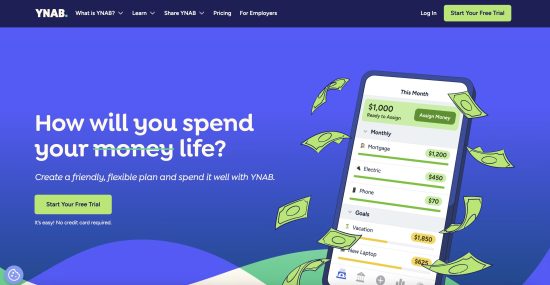
Image Source: YNAB
You Need a Budget is another zero-based budgeting app that can help you get your finances under control. However, it has a steeper learning curve than EveryDollar due to its advanced features. YNAB encourages users to “age their money” by keeping funds in their bank account unspent for longer periods of time. Doing this is supposed to help break the paycheck to paycheck cycle. To track your progress, the app keeps tabs on how old the money you’re spending is.
To help you identify trends in your spending patterns, YNAB allows you to generate more in-depth financial reports than EveryDollar. For example, EveryDollar only provides monthly reports of your total spending, while YNAB allows you to view the amount you spent in different categories across any time period. You’ll also get detailed expense vs. income reports, net worth tracking, age of money reports, and more. Another difference between EveryDollar vs YNAB is transaction sorting. YNAB automatically tags and categorizes your purchases for you, whereas EveryDollar requires you to sort your transactions manually.
YNAB also helps users account for their “true expenses.” These are infrequent costs people often forget about, such as haircuts and car registration fees. You can set up individual sinking funds for these expenses within the app. You can also create monthly budget categories for your regular spending and organize them into broader category groups. For example, you could create a “needs” category group to see all of your essential bills in one place. These features enable you to get more granular with your budgeting.
EveryDollar vs YNAB: Which Is Cheaper?
Image Source: EveryDollar
When comparing EveryDollar vs YNAB, it’s important to consider that EveryDollar has a free version, whereas YNAB does not. EveryDollar’s basic tier has fewer bells and whistles than YNAB. Free users can’t track their net worth, automatically sync their bank transactions, or create sinking funds. However, I can’t complain too much since I’m not paying anything to use the app.
If you don’t want to manually enter your transactions, you can upgrade to EveryDollar’s premium subscription. It costs $17.99 per month or $79.99 per year when billed annually. YNAB’s monthly subscription is $14.99, making it slightly cheaper than EveryDollar. But YNAB’s annual plan is actually more expensive at $109 per year.
Both budgeting apps offer free trials to new users. YNAB gives you 34 days to test it out, whereas EveryDollar only provides a 14-day trial of the premium plan. So I’d suggest signing up for EveryDollar’s free plan first to get your feet wet.
EveryDollar vs YNAB: Which Is Best?
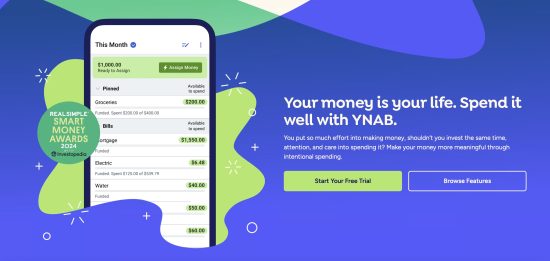
Image Source: YNAB
One of the main differences between EveryDollar vs YNAB is how negative balances are displayed. My YNAB account was configured to carry budget shortfalls over to the next month, whereas EveryDollar resets back to zero. I prefer the blank slate that EveryDollar gives me because it makes me feel more empowered to take control of my finances.
Obviously, if I screw up and spend more than I earn, I still have to figure out how to cover that shortfall. But watching the negative balance rack up in YNAB was so demotivating that I stopped budgeting altogether. Instead of forcing me to dwell on mistakes, EveryDollar allows me to start fresh and commit to making positive changes going forward.
I Prefer EveryDollar vs YNAB, But You May Not
Image Source: EveryDollar
I prefer EveryDollar vs YNAB. Dave Ramsey’s app is simple, free, and relatively easy to use, although I had a few issues at first. It took me a while to realize that I could edit the title on purchases to include the name of the retailer for easier sorting. I also had trouble changing the names of budget categories to suit my needs, but eventually got the hang of it.
Certain functions in EveryDollar vs YNAB are clunkier, such as going back and forth between months to compare spending in certain budget categories. But I’m ok with clicking a few more buttons to save $14.99 per month. At the end of the day, I wasn’t using YNAB’s advanced features enough to justify the high cost of the app. I don’t think I’d get enough value out of a premium EveryDollar subscription either, so I’ll stick with the free version.
If you want to deeply analyze your spending data, create a bunch of sinking funds, and work on aging your money like fine wine, you might like YNAB better. But it was all too philosophical and overwhelming for me. I had to watch several videos and really tinker with YNAB to understand it.
EveryDollar’s setup process was much faster, and its pared down features (and free price tag) are right for me at this stage of my financial journey. If I valued convenience over price, I’d probably go with EveryDollar’s premium subscription to take advantage of features like automatic bank syncing.
Have you compared EveryDollar vs YNAB firsthand? What are your overall thoughts on the products?
Pro Tip: Did you know now you can keep track of all your financial records/data, generate business invoices remotely from any device by moving your accounting software online into the cloud with QuickBooks Hosting and accessing it via citrix xendesktop. You can also add MS office suite to the same desktop by visiting O365CloudExperts.